
AI for photography provides faster turnarounds, cleaner edits, and more consistent client work. Professionals use it to cull thousands of frames, denoise high-ISO images without smearing detail, and match color across mixed lighting. Photographers weave AI into their workflow to avoid common mistakes and focus on storytelling.
In this article, we will demonstrate how to use AI in photography without compromising creative flexibility and control. You will learn why professional photographers use automatic tools and how to integrate them into your routine.
Reason 1: Time Saving
Deadlines drive professional photography. Every hour you spend sorting, fixing noise, or masking is an hour you can’t spend shooting, selling, or pitching.
You can use AI to edit photos faster. Innovative culling tools scan a shoot and surface sharp, on-brand frames while hiding blinks and near-duplicates. Denoise and demosaic engines clean high-ISO files in a single pass without smearing textures, so you don’t waste time on sliders.
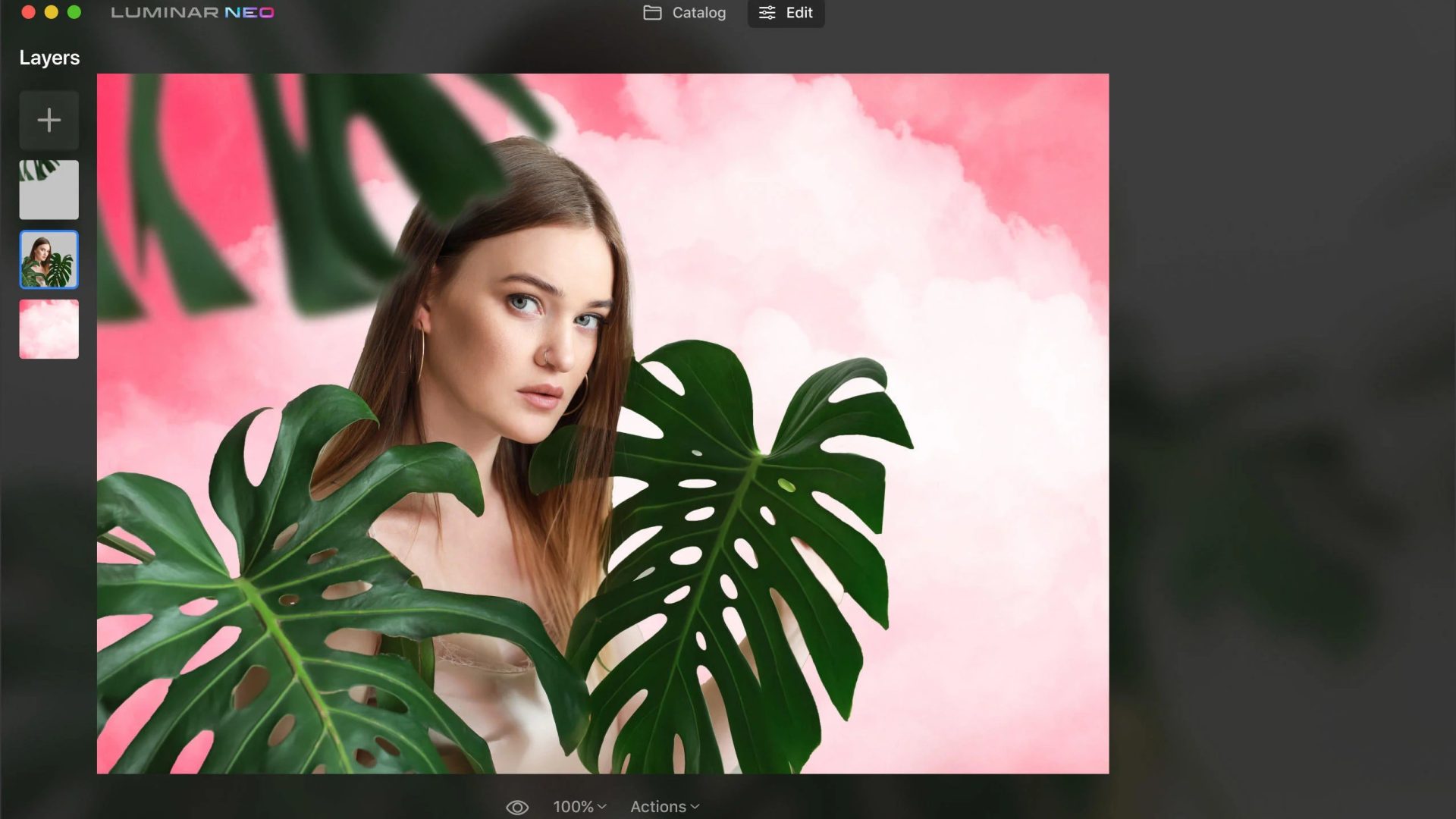
An automatic image layer editor can help find subjects, skies, and small objects instantly, and make your adjustments more targeted. It will be beneficial for composites, local relighting, and sky swaps if the client requests minor changes to the process.
Object removal tools remove distractions in seconds, lens-correction modules automatically fix geometry, upscalers recover detail for large prints, and relight features balance mixed lighting without rebuilding a scene. Paired with cloud batch export (web/print/social sets) and tether-to-edit handoffs, these tools compress turnaround by 30–50% on real client jobs.
Reason 2: Creative Differentiation
Technologies can help artists grow and develop creatively. Clients hire photographers for the looks they cannot find elsewhere.
Artificial intelligence is often portrayed as a threat to real artistry, but the best AI photo editing tools 2025 are here to expand creative possibilities, not compromise them. These tools can help professionals test color moods, rebuild scenes, and build variations from a single capture. This approach allows advanced photographers to achieve fresh visuals, mood boards, and alternative options for various platforms.
Understand the specifics of your genre before integrating the AI tools into your workflow. For example, what is abstract photography? In this genre, shapes, textures, colors, and patterns mean much more than the actual subjects. Use artificial intelligence to rapidly prototype patterns, negative space, and color fields. Content-aware removal/addition cleans or builds scenes, encouraging compositional experiments with minimal effort.
In fine art, style-transfer and LUT-matching tools align a shoot to a reference grade in minutes. Depth-aware blur and selective contrast will help you guide the viewer’s attention in conceptual portraits.
Reason 3: Consistency & Quality Control
Knowing how to edit photos with AI means ensuring every picture meets the same standard, regardless of who took it or where it was taken. Consistency builds trust with clients and speeds approvals. Uniformity boosts brand recognition in commercial shots and reduces back-and-forth.
Teams juggle mixed lighting, multiple shooters, and tight delivery windows. Manual tweaks drift over long sessions. Minor errors are inevitable when people are tired. Artificial intelligence can help photographers establish a steady, reliable baseline for tedious tasks.
Reference-based color matching aligns a set to a hero image; rules-driven presets normalize exposure, white balance, and lens corrections. Face detection maintains skin tones and brightness across groups. Anomaly checks flag halos, clipped channels, or noise spikes before export. This approach minimizes mistakes and provides cohesive images.
Reason 4: Scalability & Smoother Collaboration
You can take larger jobs, ensuring the creative visions of all team members and clients are aligned. As assignments grow—multi-day events, seasonal e-commerce drops, multi-location campaigns—the bottleneck shifts from single-image edits to volume, handoffs, and feedback.
When photographers edit images with AI, they can rely on fast, smooth organization and clear previews to maintain a connection across the different sides of the creative process. Clients expect quick selects, consistent looks across channels, and painless revisions. Internal teams juggle assistants, second shooters, and retouchers.
Artificial intelligence can structure your files to prevent asset loss, version drift, or cycle stretch. Auto-tagging and face/object recognition organize imports by person, product, and scene. Intelligent culling turns thousands of frames into tight contact sheets for client review. The shot-similarity search can help you find alternatives to specific shots when clients or colleagues disagree. AI-generated proof galleries apply safe base grades, watermarks, and web-sized exports on schedule.
Conclusion
Artificial intelligence has redefined the professional photography standards. Incorporating AI editing tools into photography not only streamlines workflows and enhances creative possibilities but also ensures consistency and quality across projects. Photographers can better meet their clients’ demands without sacrificing their unique vision or storytelling. As the industry evolves, embracing these technologies can significantly elevate both the creative process and the final product.